Claim the package names¶
Spectio needs three names before its bridges can be installed from a terminal: the plugin ID nf-spectio on the Nextflow plugin registry, and spectio and snakemake-logger-plugin-spectio on PyPI (inbox #66; dev-env §12 owns the release mechanics). Thomas does every step on the two sites; Claude never publishes. Every fact below was checked on 2026-10-29 in the name-claim verification.
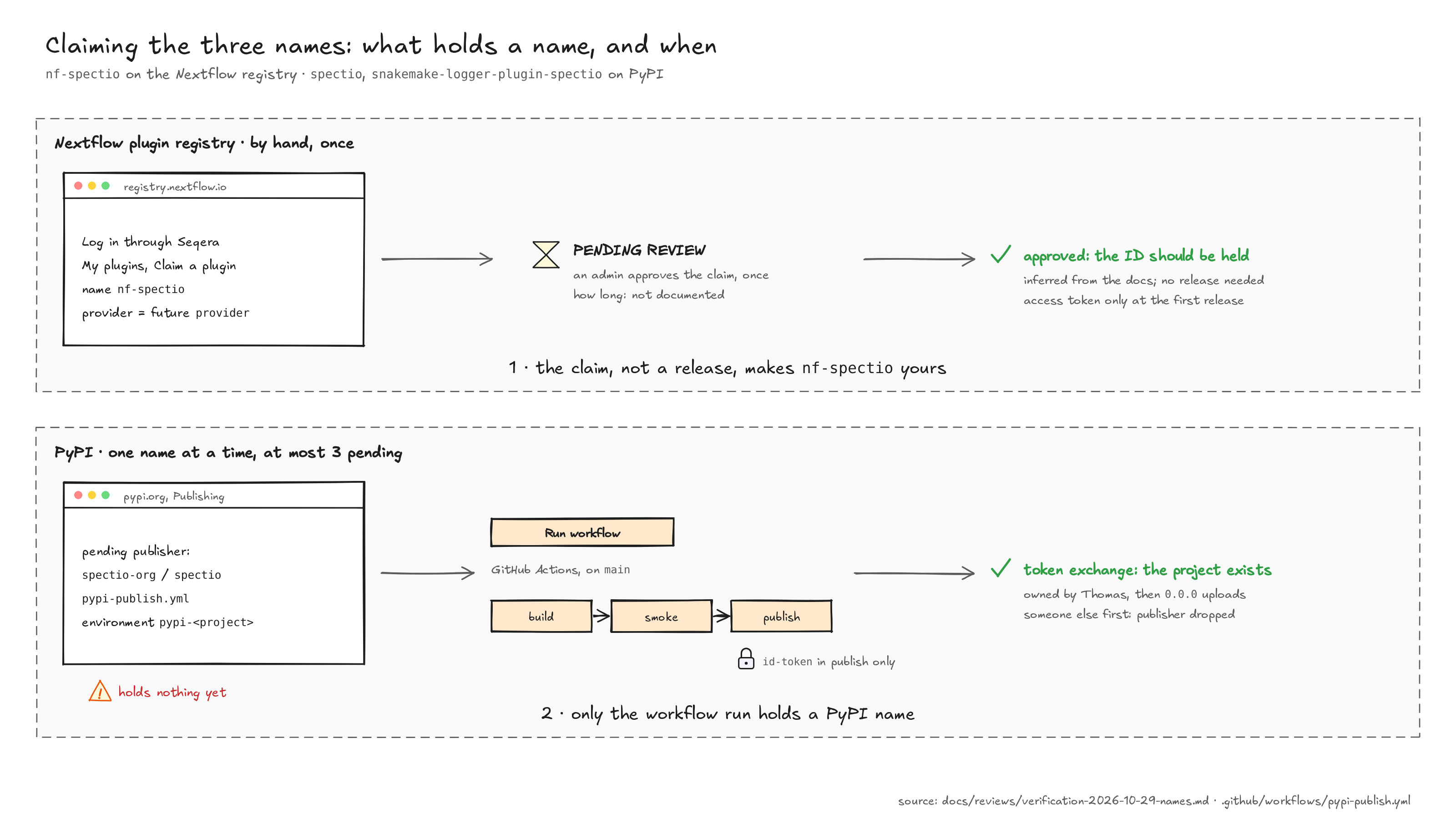
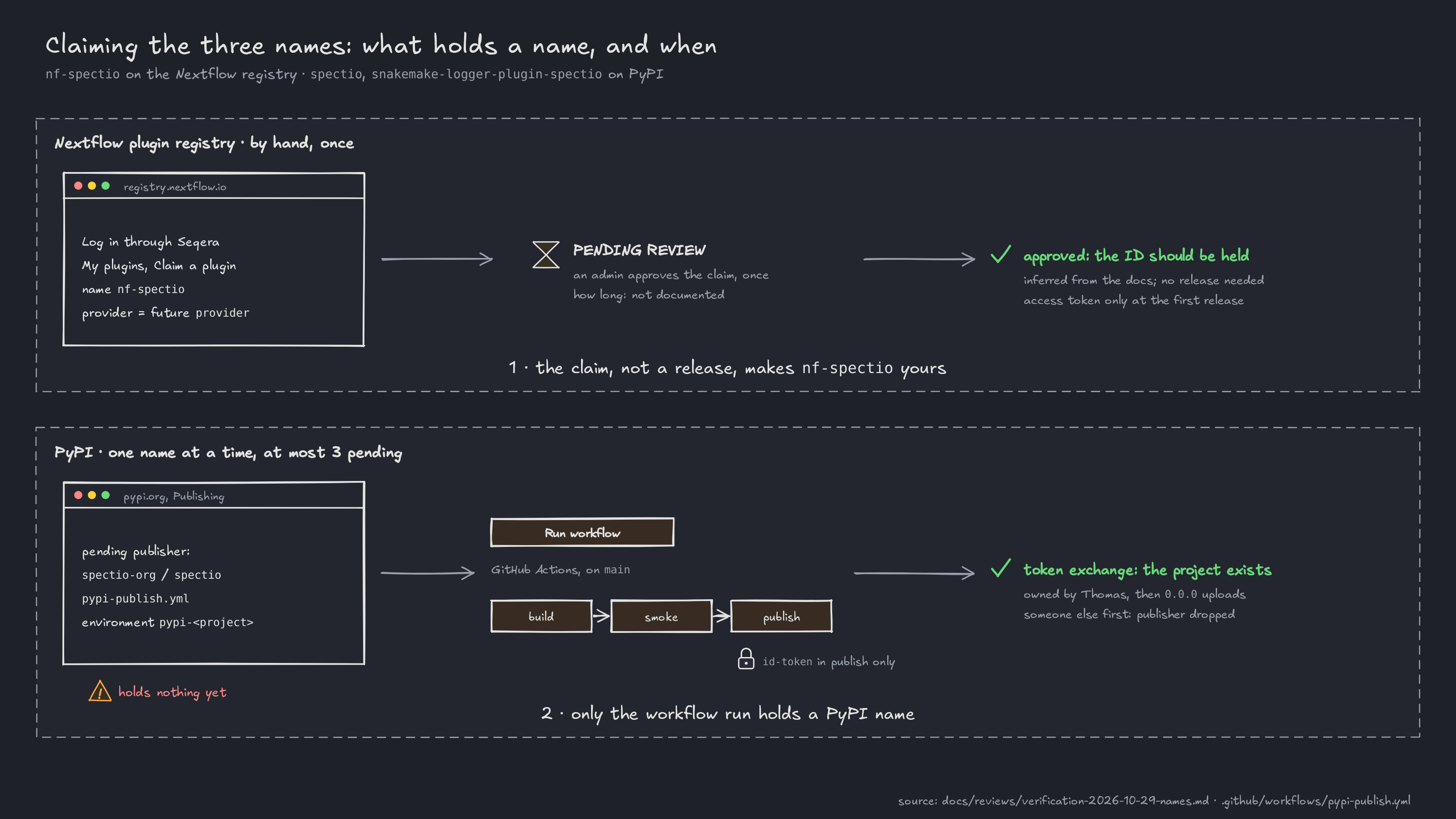
In short:
- Nextflow registry: the claim is what makes the ID yours: no release, and no placeholder. That an approved claim holds the ID against anyone else is inferred from the docs, not stated (§1, step 5).
- PyPI: only a project that exists holds a name. A pending trusted publisher holds nothing until the workflow has run once.
1. nf-spectio on the Nextflow plugin registry¶
- Sign in at https://registry.nextflow.io/ with "Log in". Sign-in goes through Seqera (GitHub, Google or email); a first login sends an authentication link by email (plugin registry docs; nextflow
docs/plugins/plugin-registry.mdx:20-26at00143fb). - Decide the provider string first. The claim's Provider must equal
nextflowPlugin.providerin the plugin's Gradle build, or the first release is refused (Gradle plugin guide;gradle-plugin.mdx:24-26,plugin-registry.mdx:32-35). For examplespectio-org, the repository's organization; it is Thomas's choice. - Claim the ID: My plugins, then Claim a plugin. Plugin name
nf-spectio, Provider as above, then Submit Request (plugin-registry.mdx:28-38). The ID is the GradlerootProject.nameand must match[a-zA-Z0-9-]{5,64}; thenf-prefix is a convention, not a rule (nextflow-plugin-gradleNextflowPluginConfig.groovy:133-136atcedaf05). - Wait for approval. The claim shows as PENDING REVIEW under Pending Ownership Requests until an admin approves it; approval happens once (
plugin-registry.mdx:40). How long it takes, and whether a pending claim already blocks others, is not documented [to be validated]. Whether the admins expect a public repository is [to be validated]. - Once approved, stop. "Ownership of a plugin is required to publish" (
plugin-registry.mdx:16) and "You can claim a plugin even if it doesn't exist in the registry yet" (gradle-plugin.mdx:109-111), so an approved claim should hold the ID with no release. This is an inference: the docs do not say that a second claimant is refused [to be validated]. Do not upload a placeholder: a release needs a README with Summary, Get Started, Examples and License sections and no placeholder text (gradle-plugin.mdx:82-101). - Access token: only at the first real release, because tokens expire. Access tokens, then Create New Access Token, name, expiry, Generate token; it is shown once (
plugin-registry.mdx:44-62). Whether a token can be limited to one plugin is not documented [to be validated].
2. The two PyPI names¶
spectio-open is no longer needed (2026-10-29)
The laptop command became spectio open, inside the spectio package (decision log). If its pending publisher still exists on pypi.org, delete it under Publishing; delete the GitHub environment pypi-spectio-open too. Nothing was published under that name.
2.1 Before you start¶
- Account: a verified primary email and two-factor authentication on pypi.org (warehouse
forklift/legacy.py:541-585at481006f; PyPI two-factor docs). - The names are still free on 2026-10-29: 404 on
/simple/<name>/and on the JSON API, and no similar name in the full index under PyPI's confusable-name rule (packaging/services.py:578-611). PyPI's list of prohibited names is not public, so only the first run confirms them [to be validated on upload]. - What gets uploaded: a small, working
0.0.0release of each project, fromtools/release/pypi-placeholders/. PEP 541 removes projects with "no functionality" as name squatting (PEP 541, invalid projects), so each one does something:spectioinstalls a command that prints its version and what Spectio is;snakemake-logger-plugin-spectiois a real Snakemake logger that writes each log event as one JSON line (--logger spectio). No source gives a minimum [to be validated]. - Why
0.0.0: a file name can never be uploaded twice, even after deletion (warehousedocs/user/publishing/troubleshooting.md:19at481006f), so0.0.1stays free for the real release.
2.2 On GitHub (repository settings)¶
GitHub facts below were read on 2026-10-29 in Deployments and environments, Managing environments and Manually running a workflow.
- Protect
mainfirst. A classic branch protection rule onmain(set by Thomas, 2026-10-29): Require a pull request before merging with no required approvals, Require status checks to pass with the CI checks selected, and force-pushes and deletion blocked (the default). Approvals are not required because the agents' PRs carry Thomas's account, and GitHub does not let an author approve their own PR. What reachesmainhas passed CI, and with no required reviewer on the environments (step 3) that is what guards a publish. Do not run the workflow before it is set. - The workflow reaches
mainthrough the promotion PR. This change merges intoautopilot/integration; "To trigger theworkflow_dispatchevent, your workflow must be in the default branch" (Manually running a workflow), so Run workflow appears only after the integration branch is promoted tomain. Thepublishjob also runs only frommain(if: github.ref == 'refs/heads/main'). - Create the two environments before the first run (Settings, Environments):
pypi-spectioandpypi-snakemake-logger-plugin-spectio. "Running a workflow that references an environment that does not exist will create an environment with the referenced name … the newly created environment will not have any protection rules or secrets configured" (Managing environments), so a missing environment would publish from any branch. For each environment:- Required reviewers: none. Thomas, 2026-10-29: "pas grave si on publie, on fera des patchs" (no harm if something gets published, we will release patches). A run publishes with no approval step.
- Deployment branches and tags: "Selected branches and tags", with the one rule
main. - Allow administrators to bypass configured protection rules: unticked. "By default, administrators can bypass the protection rules" (Deployments and environments).
- Then open the environment page and check that it lists these rules.
- What guards a publish, then: only what reaches
maincan be published, somain's protection (step 1) is the guard. Anyone, or any agent session, that can start a workflow onmainwith Thomas's account can publish; inbox #71 decides whether agent sessions may. A released file cannot be replaced, only followed by a new version, or yanked.
2.3 On pypi.org: one pending publisher per name¶
For each name, Your account, then Publishing (/manage/account/publishing/), then "Add a new pending publisher", GitHub tab:
| Field | Value |
|---|---|
| PyPI project name | spectio, then snakemake-logger-plugin-spectio |
| Owner | spectio-org (the repository moved there on 2026-10-29, inbox #9; a publisher added with weber8thomas no longer matches and is removed, then added again) |
| Repository name | spectio |
| Workflow name | pypi-publish.yml |
| Environment name | pypi-spectio (the pypi-<project> that matches the name) |
A pending publisher holds nothing
"A 'pending' publisher does not create a project or reserve a project's name until it is actually used to publish. If … another user registers the project name before you actually publish to it, your 'pending' publisher will be invalidated" (warehouse docs/user/trusted-publishers/creating-a-project-through-oidc.md:28-35). Run the workflow right after you add each publisher. At most 3 pending publishers can exist at once per account (accounts/views.py:1952-1971): more than the two names need.
2.4 Run the workflow¶
Actions, pypi-publish, Run workflow on main, pick the project, run. Three jobs:
buildruns only uv (its download checked againstUV_SHA256) and the pinneduv_buildbackend:uv build, records the files' sha256 sums as a job output, then uploadsdist/. No third-party checker runs in the job that produces the files;smokeworks on a downloaded copy:twine check --strict, the wheel's file list againstwheel-contents.txt, then installs the wheel and runstools/release/pypi-placeholders/smoke.py(the CLI's--version; for the logger, one event written as valid JSON, a symlink, a FIFO, a hard link or another user's file refused, a loose file tightened to 0600). It runs third-party code while the run's artifact token is live, sopublishdoes not trust the artifact on its name alone;publishneeds both, runs only frommain, and alone getsid-token: write; it checks the downloaded files against the build job's sums and count, then uploads them withpypa/gh-action-pypi-publishv1.14.3. Tool versions are pinned indev/versions.env. The project is created, owned by the account that added the pending publisher, when the workflow exchanges its GitHub token, before any file is uploaded (oidc/views.py:208-294). Repeat for the other two names, then checkhttps://pypi.org/p/<name>.
After the first run, the pending publisher becomes a normal trusted publisher on that project; later releases use the same workflow file and environment (dev-env §12).
2.5 Fallback: upload by hand¶
If the workflow cannot run (the promotion is not merged, the Actions minutes are gone), the names can be taken from a laptop, in one sitting:
- Make an API token scoped to the whole account (the projects do not exist yet) in Account settings, API tokens (warehouse
docs/user/publishing/publishing-to-pypi.md:21-41). - For each of the two names, from the repository root (
twine==7.0.0isTWINE_VERSIONindev/versions.env):Usernameuv build --out-dir dist/<name> tools/release/pypi-placeholders/<name> uvx twine==7.0.0 check --strict dist/<name>/* uvx twine==7.0.0 upload dist/<name>/*__token__; paste the token only at twine's password prompt. Never put it on the command line, in an environment file or in~/.pypirc. - Revoke the account-wide token as soon as the second upload is done.
- Then add the trusted publisher of §2.3 on each new project, under Manage, Publishing; publishers on existing projects do not count against the limit of 3.
3. Afterwards¶
- Inbox #66 is answered when the three names are held; tell Claude which provider string the claim used, so
nf-spectio's Gradle build matches it. - The Snakemake plugin catalogue finds the logger by its exact display name
snakemake-logger-plugin-spectio(snakemake-plugin-catalogsource/collect_plugins.py:188-189atd2c11a2) and warns without aRepositoryURL (:243-250). It readsdocs/intro.mdanddocs/further.mdat the root of theRepositoryURL'smainormasterbranch (:636-665), not from the package. In this repository that rootdocs/is the MkDocs site; the catalogue's text isdocs/intro.md, excluded from the site inmkdocs.ymland shown once it is onmain(decision). The listing itself needs nothing more: the catalogue rebuilds daily (deploy.yml,cron: "50 4 * * *") from every PyPI project namedsnakemake-logger-plugin-*, so the logger appears the day after its first upload. The catalogue also installs the package and asks Snakemake's logger registry for the plugin (:95-141), so a release that does not import fails on its page. - TestPyPI is a separate site and holds nothing on pypi.org (Using TestPyPI); it is not needed here.
4. Open points¶
- Agent permissions (SEC-1, Thomas decides, inbox #71). The security review proposes that
.claude/settings.jsondenygh workflow run,gh api …/pending_deployments,gh api …/dispatchesandgh run rerun, so no agent session can start or approve a publish. Claude does not edit its own permissions; until Thomas decides, the environments' required reviewer (§2.2) is the guard. - Where the logger's catalogue page lives. Decided 2026-10-29: a root
docs/intro.mdkept out of the site (§3). - Choices: the placeholder version (
0.0.0proposed) and the registry provider string.