Spectio — documentation system¶
Status: draft v0.1 · 2026-10-26 · author: Thomas Weber (with Claude)
Step page: F5, how this spec was written and checked.
Companion docs:
dev-environment-and-testing.md: CI workflows (§11), versioning and releases (§12), dev previews (§7), instance verification (§13).../playbooks/autopilot.md: the loop that runs the steps. This spec says what each step must leave in the docs; the autopilot says when it runs.ui-spec.md: the boards that screenshots are taken from.
Sources:
- the audit of depictio's docs site, diagram toolkit and media (
docs/research/depictio-docs-system-2026-10-26.md, depictio-docs at1610ed8, depictio at0d1aa0a); - the tooling spike (
docs/research/spike-docs-media-tooling-2026-10-26.md).
0. Decisions in brief¶
-
Docs are part of the definition of done. A step, a PR or a release is done only when:
- its pages are written;
- its pages are reviewed by a separate agent;
- the site builds with
--strict.
"Docs later" is not an option. The documentation grows one verified step at a time.
-
depictio's format, kept and fixed. Spectio reuses depictio's site:
- MkDocs Material and mike versions;
- a landing page with hero, ecosystem cards, component cards and numbered features;
- a curated per-version changelog;
- hand-drawn diagrams from
sketch.py; - asciinema casts and light/dark screenshot pairs.
It also closes depictio's gaps:
- no inline CSS: the landing page has 0 lines of
<style>, against about 2 270 in depictio; - casts are generated from scripts, not recorded by hand;
- combined terminal and browser captures;
- a strict build and a diagram check on every PR, not only at deploy time.
-
Writers and reviewers are different agents.
doc-writerwrites pages and the PR body.diagram-artistdraws the figures.media-capturetakes the screenshots, casts and videos.doc-reviewerstarts from a fresh context, scores the result against a rubric, and can block.
Nobody grades their own work.
-
Diagrams are drawings, not box charts. Figures that explain a mechanism use the sketch toolkit:
- pictograms (terminal, cluster node, phone, gate, bucket);
- to-scale bars;
- numbered captions.
Mermaid is kept for small structural diagrams inside specs (sequence, state, ER), where text-diffability matters more than looks.
-
Every PR carries its docs. The PR body has:
- the summary;
- the docs pages changed (with links into the preview site);
- at least one sketch figure for
featanddocsPRs that change a mechanism; - media for UI or CLI changes;
- the checks.
PRs auto-merge once required checks pass and
doc-reviewerapproves (§8).
1. Site structure¶
Top tabs (Material navigation.tabs). The order follows depictio-docs: user-facing first, everything technical under Developer. Revised 2026-10-26: the first version put the specs at the top level, which was too technical for a first visit.
| Tab | Content | Phase |
|---|---|---|
| Home | landing page (§2) | now |
| Installation | the three ways to run Spectio; "nothing to install yet" until 0.1 | now (short), full from 0.1 |
| Usage | how Spectio works: the five words, a run without gates, a run with an optional gate; later the guides | now (short), guides from M1 |
| Features | one short page per area (runs, runners, optional QC gates, administration, depictio), each with its screen designs, its status and a link to the owning spec | now |
| API | the headless API and the CLI in plain words; later the generated reference (§9) | now (short) |
| Developer | documentation map, Progress (§3.2), specifications, playbooks, reviews, decisions, research | now |
| Roadmap | done, now, next, ideas, with the release stages as a timeline | now |
| Changelog | curated, one block per version (§6) | now (empty until 0.1.0) |
Writing for users. User-facing pages are short, use plain words, and say plainly what is designed and what is built. Gates are presented as optional: most pipelines run straight through.
Theme and assets.
- Theme
material, withcustom_dir: overrides. The overrides preload the Virgil font for inlined sketches and set a footer. - Logo and favicon: the emblem (
docs/assets/brand/). - Fonts: Outfit for headings, Inter for text, JetBrains Mono for code, as in the UI tokens.
- One stylesheet,
docs/stylesheets/extra.css, which maps Material variables to the Spectio tokens (design/tokens/spectio-tokens.css) and holds the landing-page classes. - Extra JavaScript is limited to
asciinema.js(lazy player, §5.2).
Material features: navigation.tabs, .sections, .top, .indexes, .instant, .tracking, content.code.copy, .annotate, search.suggest, .highlight, toc.follow.
Markdown extensions: admonition, attr_list, md_in_html, footnotes, def_list, pymdownx.details, .superfences (mermaid), .tabbed, .emoji (twemoji), .tasklist, .snippets.
Versions with mike.
- Each release deploys
X.Ywith the aliaseslatestandstable. maindeploysdev.- The size hook from depictio (
hooks/shared_images.py) is adopted before images grow, because mike copies the site for every version. depictio hit about 2 GB ofgh-pagesagainst the 1 GB Pages limit (audit §1.5).
Toolchain lifetime. The Material for MkDocs build prints that Material reaches end of life on 2027-05-05, with critical fixes until then, and names Zensical, from the same team, as its successor (build notice seen 2026-10-26). Step D6 evaluates Zensical against this site: hooks, md_in_html, mike-style versions.
Hosting.
- Dev previews (now): Cloudflare Pages, one preview per PR, validated wave and release, each kept at its own URL, plus a
/versionspage (dev-environment-and-testing.md§7.1). This works while the repository is private, because the built site is uploaded directly. - Released versions go there too under their
vX-Y-Zalias. mike's in-site version selector is added once there are real releases (D6). - The public instance (from the beta, EMBL Kubernetes,
dev-environment-and-testing.md§7.4) serves its own docs.
Analytics on the docs site. None by default. Material's extra.analytics can be set per deployment with the same providers as the product (telemetry-and-analytics.md §4).
2. Landing page (docs/index.md)¶
Front matter hide: [navigation, toc]. The markup is HTML through md_in_html; every style lives in extra.css.
Sections, in depictio's order (revised 2026-10-26: clearer and more visual):
- Centred hero. The emblem and the name; one sentence on what Spectio does (launch, monitor and relaunch runs on your cluster); one line on gates being optional and on depictio; two buttons (How it works, Roadmap); a status badge (design phase); then the combined capture as a looping muted video.
- Works with. Logo cards for Nextflow, Snakemake, nf-core, the Snakemake Workflow Catalog, SLURM, Kubernetes and depictio. The logos are the projects' own assets, or Material's bundled Simple Icons, with a notice that they show compatibility only.
- How it works. Four illustrated steps (Launch, Watch, Fix and relaunch, Results and dashboards), each with a screen design.
- Optional quality checks. One box saying what a gate is for and that pipelines without gates run straight through.
- What is inside. Six cards with coloured icons, linking to the Features pages.
- Where it stands. The progress strip of the waves (
hooks/progress.py), and links to the roadmap, the developer docs and the changelog. - Footer. Licence, author, links, build SHA.
Check:
- the page is rendered by Playwright at 1440 × 900 and at 390 × 844, light and dark;
doc-reviewerlooks at the PNGs;- the phone render must not scroll horizontally.
3. Incremental writing and verification in the loop¶
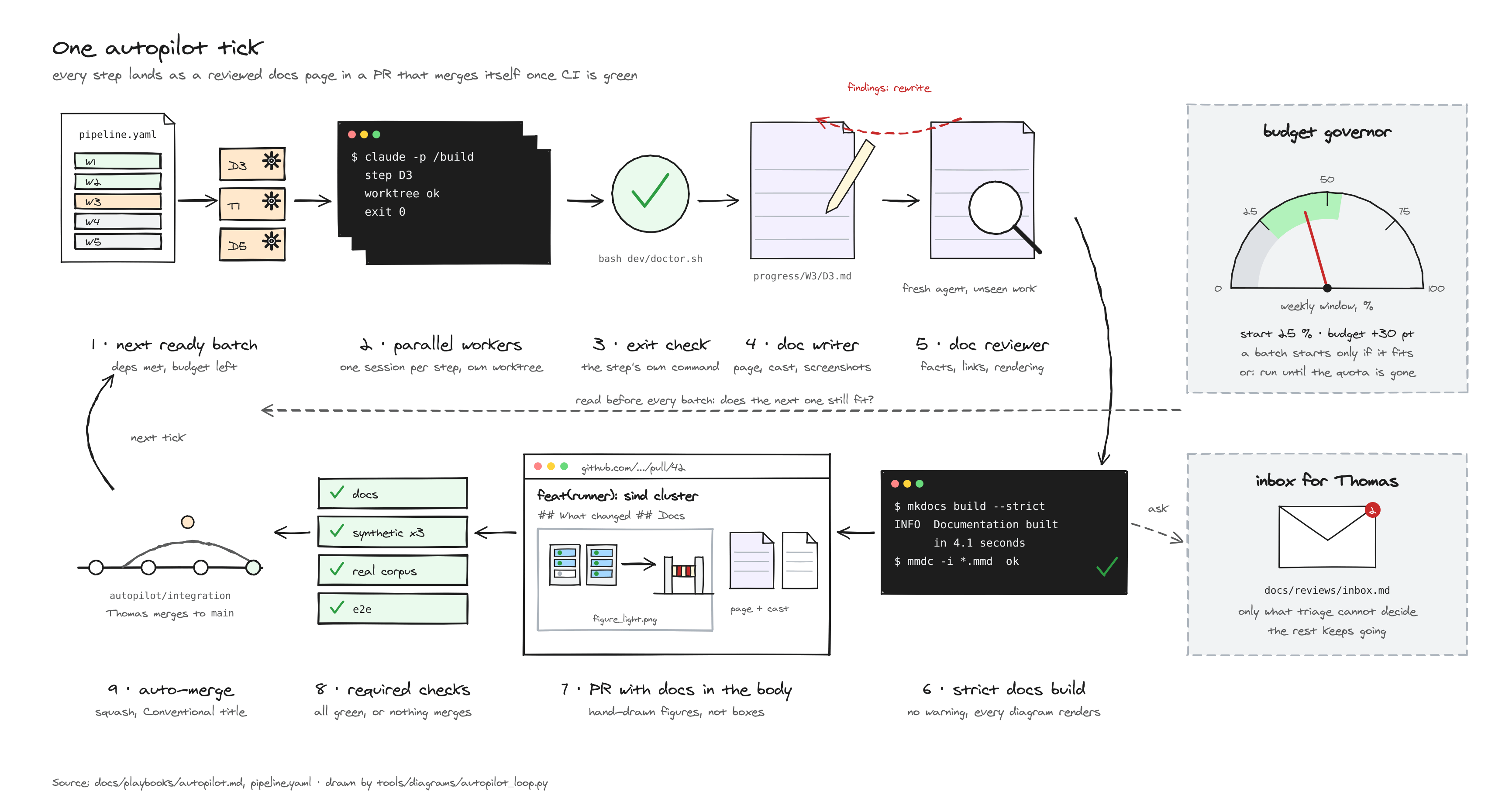
3.1 What each step kind leaves in the docs¶
| Step kind | Pages it must change | Figures and media |
|---|---|---|
review |
docs/reviews/<round>.md, plus its Progress page |
none required |
triage |
inbox and review files (status fields), plus its Progress page | none |
apply |
the owning specs, decisions/log.md, plus its Progress page with a before/after summary per finding |
a sketch when a mechanism changed |
spike |
docs/research/spike-<name>-<date>.md, plus its Progress page |
a cast of the commands that proved it; a sketch of the setup |
build (D, T, later code) |
the guide or reference page for what was built, the owning spec if behaviour was decided, plus its Progress page | a sketch for each new mechanism; a cast for each new CLI flow; screenshots for each new screen; a combined capture for a CLI-to-UI flow |
plan |
docs/plans/<id>.md, plus its Progress page |
a sketch of the milestone's architecture slice |
release |
the changelog block (§6) | the release's hero figure |
foundation (wave W0 only) |
its Progress page, written after the fact from the commits and the evidence kept in the session; the owning specs it changed | as for build; a figure or media that is not made yet is listed as a follow-up with the step that will make it |
3.2 Progress pages (docs/progress/<wave>/<step>.md)¶
One page per step, written by doc-writer during the step, not after. It has a fixed shape:
---
step: T3
wave: W3
status: done            # running | done | blocked
pr: 42
---
# T3 · Local SLURM with sind

!!! success "Done 2026-11-02 · PR #42 · 3 findings filed"

## What changed
## Why (link to the prompt and the decision)
## Evidence
## Figures and media
## Findings and open questions
- What changed: short bullets with links to the pages and files.
- Evidence: commands run, their results, and the exit check.
- Figures and media: the sketch pair, cast or screenshots.
- Findings and open questions: links to the review file and the inbox.
The Progress tab index is generated from the front matter of these pages (MkDocs hook, ordered by wave). The landing-page status strip uses the same data.
3.3 The docs gate (run by autopilot after every step, and by CI on every PR)¶
A step reaches done only when all of these pass:
mkdocs build --strict(broken links and anchors fail).- Every Mermaid block renders (
tools/docs/check_mermaid.py, which extracts the blocks and runsmmdc). - Diagram freshness: every
tools/diagrams/*.pyscript re-run gives byte-identical SVGs. The seeded RNG makes this testable; a figure whose script changed without its output, or the reverse, fails. - Media manifest: every screenshot, cast and video referenced from a page exists and is listed in
docs/assets/media.yamlwith its generator command. The churn guard (tools/media/check_churn.sh) rejects a mass change unlessSPECTIO_ALLOW_SCREENSHOT_UPDATE=1. - Required pages for the step kind (§3.1) changed, and the Progress page front matter is valid.
doc-reviewerverdict ≥approve(§4.2), stored in the Progress page front matter asreview: approve | changes | block.- Size budget: at most 5 MB of new media per PR (checked against the base branch in CI), videos ≤ 3 MB and ≤ 30 s each. GIF previews for PR bodies are generated on demand outside
docs/assets/and are not committed.
If the gate fails, the step goes back to doc-writer with the reviewer's notes. After two failed revisions, the step is blocked, with an inbox entry.
4. Writers and reviewers¶
4.1 Agents (.claude/agents/)¶
| Agent | Writes | Tools | Model |
|---|---|---|---|
doc-writer |
Progress pages, guide and reference pages, PR bodies, changelog drafts | Read, Grep, Glob, Edit, Write, Bash | opus |
diagram-artist |
tools/diagrams/<figure>.py and its outputs |
Read, Write, Edit, Bash | opus |
media-capture |
entries in tools/media/ (shots registry, cast scripts, combo scripts), docs/assets/ outputs, media.yaml |
Read, Write, Edit, Bash | sonnet |
doc-reviewer |
nothing in the docs; returns a verdict and findings | Read, Grep, Glob, Bash | opus |
Writers:
- Sources. Writers work from the step's actual outputs (diff, logs, test reports), never from the prompt alone.
- Style. Writers follow the repository style:
- plain English;
- short sentences;
- lists for scanning, tables for comparing;
- every external fact sourced, or marked [to be validated].
doc-reviewer:
- runs with a fresh context;
- receives only the changed pages, the step's outputs and this spec, not the writer's reasoning.
4.2 Review rubric¶
Each criterion is scored 0–2, with a one-line justification.
| Criterion | 2 means |
|---|---|
| Accuracy | every claim matches the diff, the logs or a cited source; commands were run |
| Completeness | the pages §3.1 requires are present; a newcomer could repeat the step |
| Ownership | the topic changed in its owning spec only; other pages link to it |
| Clarity | scannable; a page title says what it is; no unexplained jargon |
| Figures | a mechanism is drawn with pictograms, not boxes; labels legible in light and dark (reviewer opens the PNGs) |
| Media | screenshots match the current boards; casts replay; videos play and are short |
| Navigation | the page is reachable from the nav, the Progress index and its spec |
Verdict:
approvewhen every criterion is ≥ 1 and the total is ≥ 11 / 14;changesotherwise;blockfor any inaccuracy that would mislead a user, or a secret or personal data in media.
5. Media¶
5.1 Screenshots¶
The registry.
tools/media/shots.pyis a registry of named shots, like depictio'sdocs_screenshots.py.- It has
listandrun --shot NAME --theme light|darkcommands. - The viewport is 1440 × 900, or 1440 × 1180 for tall pages, plus 390 × 844 for phone shots.
Sources, by phase:
- Design phase: shots are rendered from
design/ui-canvasboards withtools/canvas/render.js. The boards have no dark variant, so design-phase shots are light only. Names are substituted fromtools/media/fixtures.yamlbefore rendering, so no real name, path or cluster appears (§5.5). - Implementation: the same names are taken from the running app with Playwright, against the seeded demo data.
Pairs and embedding.
- Shots are saved as WebP light/dark pairs.
- They are embedded with
#only-light/#only-dark, inside a link that opens the full image. Pages with many shots setglightbox: true.
5.2 Terminal casts¶
Generated, not recorded.
-
Each cast has a script,
tools/media/casts/<name>.yaml, with:- title and size;
- the steps (commands, narration comments, typing speed);
- output trimming.
-
tools/media/cast.pyruns the commands for real and writes an asciinema v2 file with synthetic, stable timestamps. - When the CLI changes, casts are regenerated in CI and the docs gate catches casts that no longer replay.
Embedding:
- markup:
<div class="asciinema-cast" data-cast="assets/casts/<name>.cast"></div>; - player:
asciinema.jslazy-loads asciinema-player 3.17.0 and remounts on Material's instant navigation; - theme:
spectio.
Tool choice. asciinema is preferred to VHS GIFs: the text stays selectable and the files are small. VHS can be added for GIFs in the README if needed.
5.3 Browser videos¶
Playwright record_video captures a scripted UI flow (open run → open gate → decide):
- WebM from Playwright, converted to MP4 (H.264) for compatibility, plus a GIF preview of at most 4 MB at 10 fps for PR bodies (generated outside
docs/assets/, not committed); - at most 30 s, 1280 × 720.
5.4 Combined terminal and browser captures¶
What it shows. One video shows a CLI action and its effect in the UI side by side. For example, spectio run … --gate qc in the terminal, then the gate opening in the browser and being approved, then the terminal resuming.
How it is made.
-
tools/media/combo.pydrives a Playwright page with two panes:- the asciinema player playing the cast;
- the browser pane, showing the app (or boards in the design phase) at timestamps set in
tools/media/combos/<name>.yaml.
-
The page is recorded with Playwright video and converted with ffmpeg.
- Captions come from the same YAML.
depictio has no equivalent (audit §4.4).
5.5 Data hygiene¶
- Media use only demo data and fixture users. No real emails, tokens, hostnames or paths.
doc-reviewerchecks the frames, andblocks on a leak.- Generators run against the seeded demo instance, which has fixed names (
demo-hpc,alice@example.org).
6. Changelog¶
Two layers, as in depictio.
- Layer 1, raw:
release-pleasewritesCHANGELOG.mdfrom Conventional Commit titles. Its output becomes the GitHub release body (dev-environment-and-testing.md§12). - Layer 2, curated:
docs/changelog/index.md. When the release PR opens,doc-writerdrafts the new block from the merged PR bodies, anddoc-reviewerreviews it in the release PR.
Block format (one per version, newest first, depictio's shape):
## [v0.3.0](https://github.com/weber8thomas/spectio/releases/tag/v0.3.0) · 2026-12-04

!!! success "Minor: gates on SLURM runs, decided from a phone"

### ✨ New
* **Stop at a QC gate on SLURM**: the runner pauses after `qc` and waits for a decision.
  See [Gates](../guides/gates.md#slurm) ([#57](https://github.com/weber8thomas/spectio/pull/57), [a1b2c3d](https://github.com/weber8thomas/spectio/commit/a1b2c3d)).

### 🚀 Improved
### 🐛 Fixed
### ⚠️ Breaking
### 📦 Images and packages
- Admonition type by release size:
successfor a minor release,infofor a patch,warningfor a release with breaking changes. -
Each bullet:
- a bold lead that says what users can now do;
- one sentence;
- links to the feature page, the PR and the commit.
-
Breaking changes come with a migration note.
7. Pull requests¶
7.1 Template (.github/pull_request_template.md)¶
The template keeps depictio's sections and adds Spectio's own. depictio's sections:
- summary;
- type;
- related issue;
- how it was tested;
- checklist.
Spectio adds:
- docs: pages changed, with preview links (Cloudflare preview of the PR);
- figures: sketch pairs embedded;
- media: a GIF or a link to the MP4;
- specs touched and decision-log entry;
- review verdict from
doc-reviewer.
7.2 Generated body¶
Generation. doc-writer writes the PR body from the step's Progress page.
Figure links. Figures are embedded with raw.githubusercontent.com URLs pinned to the PR head SHA. A pinned URL keeps showing the figure after the branch is rebased; while the repository is private, GitHub serves these URLs only to readers who have access.
Example:
## Summary
Local SLURM cluster with sind for scenario tests (T3).
## Docs
- [Progress · T3](https://pr-42.spectio.pages.dev/progress/W3/T3/) · [Dev environment §5](https://pr-42.spectio.pages.dev/specs/dev-environment-and-testing/#5-...)
## How it works

## Evidence
`pytest tests/slurm -q` → 14 passed · scenarios on sind: 11/11 · [cast](https://pr-42.spectio.pages.dev/assets/casts/sind-up.cast)
## Checks
- [x] docs build --strict · [x] mermaid · [x] diagrams fresh · [x] media manifest · [x] doc-reviewer: approve (13/14)
🤖 Generated with [Claude Code](https://claude.com/claude-code)
Preview links. They point at the PR's Cloudflare preview (https://pr-<n>.spectio.pages.dev/…). previews.yml comments them on the PR, together with the "Open in Codespaces" link.
7.3 PR checks (docs.yml, required)¶
- strict build;
- Mermaid render;
- diagram freshness;
- media manifest and churn guard;
- PR body lint: the required sections are present;
featanddocsPRs that touchdocs/specs/ortools/have at least one figure, unless labelledno-figurewith a reason; - Conventional Commit title.
8. Auto-merge¶
Policy.
-
A PR merges automatically (squash, through GitHub's native auto-merge) when:
- all required checks pass (§7.3, plus the pipeline workflows the PR touches);
- its
doc-reviewerverdict isapprove, posted as a PR review by the bot account; - it has no
needs-humanlabel.
-
On
autopilot/integration: auto-merge is always on. - On
main: auto-merge is on only when the repository variableAUTOMERGE_MAINistrue. Thomas sets that variable, which is the switch from "humans merge to main" to "CI merges to main".
Never auto-merged:
human_gatesteps;- a release PR at 1.0.0 or above (the 1.0 gate,
dev-environment-and-testing.md§14). A 0.x release PR auto-merges like the others onceAUTOMERGE_MAINistrue. The autopilot merges one at the end of a milestone or of a wave that changed the product, not after everyfeat; - PRs that change
.github/workflows/,.claude/settings.json, auth or secrets code, orpipeline.yamlstatuses.
Who configures it. Thomas sets up branch protection and the auto-merge setting once, with the gh commands in docs/playbooks/autopilot.md §8. Agents cannot change repository settings or their own permissions.
9. Generated reference (from M1)¶
API reference.
- Generation. depictio's release workflow is copied: import the app inside the released image in a mode that needs no database, dump
app.openapi(), check it withjqand a minimum path count, stamp it with the version, and open a docs PR (audit §1.6). - Requirement. This needs the no-database import mode in
spectio-serverfrom day one (architecture-plugins-and-packaging.md§6).
CLI reference. Generated from the Typer command tree (mkdocs-typer or a small generator).
Configuration reference. Generated from the Pydantic settings models:
- one table per plugin kind;
- for each setting: environment variable, TOML key, default and description.
10. What "verified" means for docs¶
A docs claim is verified when one of these holds:
- the command in it was run in the step and its output is in the Evidence section or a cast;
- the screenshot was generated from the current board or app build;
- an external fact links its source.
doc-reviewer samples at least three claims per page and re-runs them when they are commands that run in under a minute.